DVI VISION Release Notes
2025/07/08 to 2026/01/05
- Areas affected: RxEntry Lenses
Radii are now always less than the blank diameter after the smoothing step.
- Areas affected: RxEntry Lenses Digital Surfacing
Changing the digital manufacturer assigned to a style to none will now properly remove the connection.
It allows for more accurate processing and control of a lens style
- Areas affected: RxEntry Pricing
This fixes an issue where a discount could add to a total balance instead of subtracting from it.
NOTE -To ensure your invoices are generated correctly after this update, we recommend a quick check of your service codes. If you have any items set up as a "(Flat via a discount)" (Type F) that are actually intended to be a fee, please change their type to "Miscellaneous Flat Charge" (Type M). This will ensure they continue to function as intended.
This is useful because it makes it more clear that discounts should be a reduction in net charge.
If you have any questions, please contact support@thedvi.com
- Areas affected: Account Inquiry Frames Invoicing and Shipping
Adding the ability to assign components to the FTC Bin for a particular job. Components consist of Frames, Lenses, Case, Tint Sample and MISC. These are default options, not able to customize at this point.
Gives the lab the opportunity to utilize the bin for job components to eliminate the need to place in the job trays. Alerts the lab that there are items that need to be placed with the job before shipping.
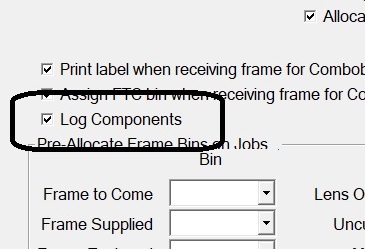
Enable in FTC BIN SETUP
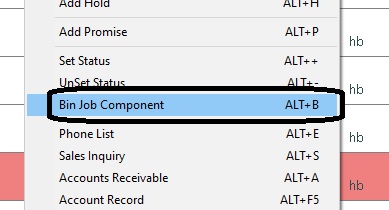
ALT B will allow receiving in WACTINQ
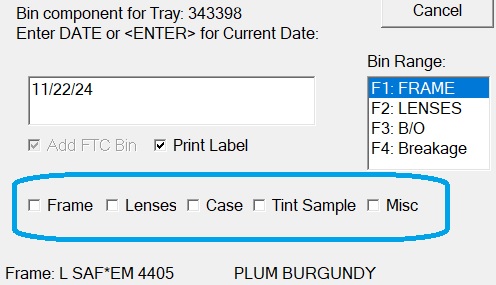
Components
- Areas affected: Invoicing and Shipping Account Inquiry
This allows labs to send delay notices via a file input to the program.
This automates a task that would otherwise be manual. The program is gdelay and should be called using the command options shown in the attached image from the program help documentation. For example:
gdelay.exe L /F:trayfile.txt
Would send 'Lens' delay notices for jobs listed in the file.
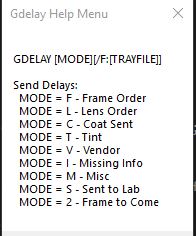
Help Menu
- Areas affected: Machinery Combobulator
Labs are now able to setup stall notifications on important systems in the laboratory to monitor and quickly be alerted of stalls.
The lab can set up recipients independently for the combobulator, machinery interfaces (on an individual basis), tray monitor, and the principal dashboard in the notifications program. The machinery interfaces also require heartbeat activation in VTM.
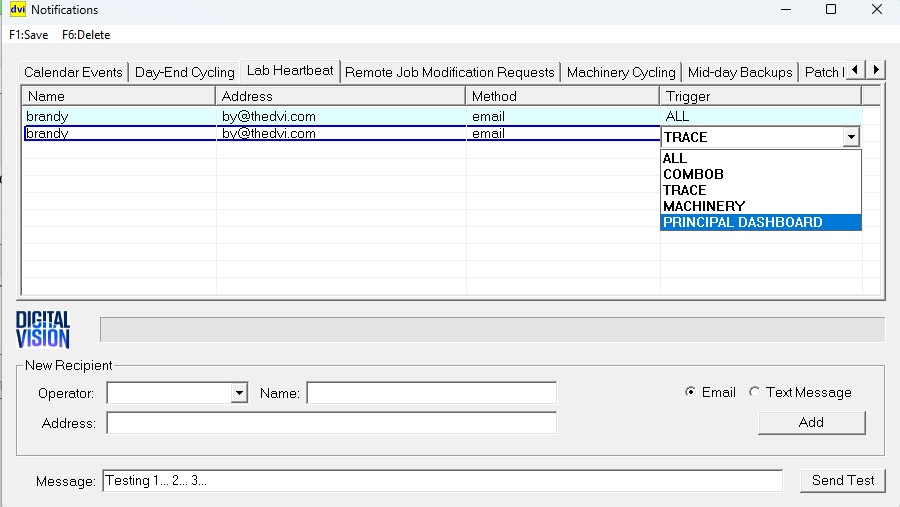
Notification Options

Selecting Monitored Machines
- Areas affected: Lenses Inventory
- Customer Request
The lens inventory system now observes the OPC-level order-via setting (as opposed to the vendor-level setting) for all perpetual ordering calculations. Previously the order-via was only used to determine the PO on which to order the item, while all other ordering variables (lead time, days to keep, next order date, etc) were determined by the item's manufacturer code.
This change improves the accuracy of the inventory ordering algorithm.
- Areas affected: Lenses Inventory
This option compares the Unsent purchase order to the Global Optics warehouse Quantity on Hand and allows the use to split off 0-quantity items to a new PO. There are two prerequisites: the lab must use a vendor code of GL or GO for Global, and DVI must relay the lab's IP address to Global Optics for white-listing.
By checking the Quantity on Hand at the Global Optics warehouse, the lab can determine if they need to substitute or order from an alternate source.
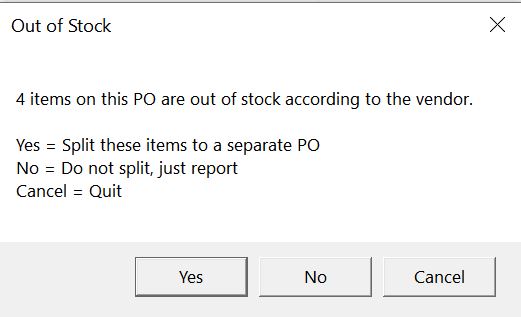
Out of stock options
- Areas affected: Frames Inventory Reporting
- Customer Request
The Frame Inventory Editor (3,2,8,7,1) now has a column for "Shelf Cost", which is the item's cost multiplied by its quantity-on-hand. This amount is totaled in the report generated by the F1:Create Item Report menu option.
This data is useful when assessing the cost of on-hand frame inventory.
- Areas affected: Invoicing and Shipping Subcon
This functionality to run in an automated way has been moved to the wait status (gwaitstat.exe) program out of the shipping (rxpwip.exe) program.
This allows labs to utilize a single program for marking jobs received and assigning subcon costs. The input file format expected by the new program is the same as that expected by the old program as outlined in this note. The command line takes the form of:
GWaitStat [/CATG:[CATEGORY]][/TYPE:[TYPE]][/F:[TRAYFILE]][/AUTO]
CATEGORIES: F - Frame Order, L - Lens Order, C - Coat Sent, T - Tint, V - Vendor, I - Missing Info, M - Misc, S - Sent to Lab, 2 - Frame to Come
TYPE: W - Wait, A - Arrived, $ - Assign Subcon Cost
/F[:SHIPFILE] - Comma delimited ship/subcontract file with the below format:
JOBNUMBER/INVOICE#,LCOST-CCOST,FCOST,MCOST,CCOST,PCOST,
TAX,SCOST,DISCOUNT,INVOICE,RMTINV,REFNUM,DVIWEBNO
Note that for assigning subcon cost without setting arrived status on jobs it is reccomended to use the following command format with coating category:
gwaitstat.exe /CATG:C /TYPE:$ /AUTO /F:subconcost.txt
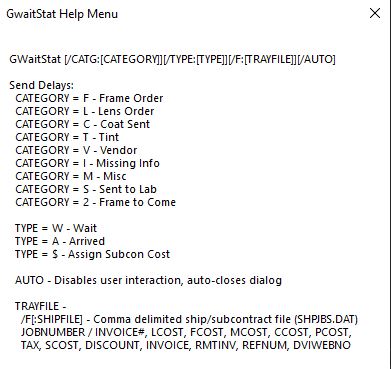
Help Menu
- Areas affected: Reporting
- Customer Request
The File->Print Definitions menu item now exports a JSON version of the report setup.
Labs that use or store these definitions should benefit from the standard format.
- Areas affected: Reporting
- Customer Request
For redo RX orders that have been redone multiple times, this field shows the descrpition value of the previous job's redo code.
This allows sophisticated reporting on redo history of a particular job.
- Areas affected: Reporting
- Customer Request
There is a new "Headings" checkbox on the Archive Report screen which allows the user to indicate that they want columns written even in DETAIL mode.
This can be useful depending on the consumer of the report output.
- Areas affected: Backup and Cycling Warnings
When the lab assigns notificaiton recipients for the database service heartbeat, these recipients will be immediately notified upon database service stall on both the server and backup server.
The database service on the server is a critial lab function and represents a lab-down situation if not running. On the backup server, a database service stall could cause cycling issues.
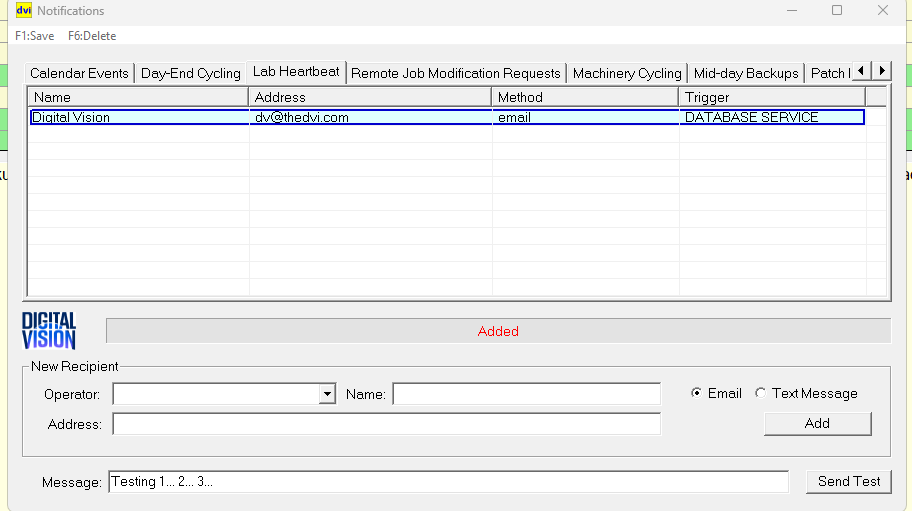
Database Service Notifications Recipients
- Areas affected: System New Process Backup and Cycling
- Related: Database Service Down Heartbeat Monitoring and Notification
This feature allows the lab to setup recipients to be notified upon database service stall on the server and backup server.
The software will stop and send a notification immediately upon database service down on the server. If the database is up on the server it will check the backup server, sending a notification if the service is down on the backup server.
Database Service recipients must be defined in the notifciations utility.
- Areas affected: System New Program
There is a new email client within the DVI system which does not rely on third-party tools. The option is "Integrated Mail" in System Setup (4,8,1,1,F9 Communications tab).
This feature improves DVI's visiblity into and control of the emailing process, improving our ability to eliminate errors and adjust to various mail server configurations.